

Digital Classroom Flip-Top
A System for Intimate Classrooms
The Digital Classroom Flip-Top, also known as “DCF” or “Flip,” is designed for use in small learning spaces, such as seminar rooms. It is a “spin off” of the Digital Classroom Podium, our standard classroom system. Recognizing that smaller rooms require a slimmed down system that does not take up as much space as a podium, we designed the Flip to take the same user experience found in the Digital Classroom Podium and house it in a table-top design. In addition to standing behind the desk, instructors can lower it to a seating position so that can sit with their students. To access the controls, they simply flip up the touchscreen monitor. Like our podium, faculty can use a built-in Mac computer or connect personal devices via a HDMI cable. The images will display on a wall-mounted monitor behind and above the instructor table.

Explore the Digital Classroom Flip-Top
We have various resources available to help you learn about and use the Flip.
-
Available in all Flips
- Mac computer, including:
- a dedicated Internet connection
- two USB ports (located on the keyboard)
- keyboard and mouse
- HDMI cables for projecting laptops, phones, or tablets
- Presenter camera and microphone that can be used to videoconference and lecture capture
- RUWireless
Available in Some Flips
- Blu-ray player capable of playing:
- Blu-ray discs
- DVDs
- audio CDs
- Interactive display for annotation, on-screen writing, computer control, and wireless display sharing
- Solstice wireless display sharing for both instructor and student laptops, phones, and tablets
- VGA cables for projecting laptops, phones, or tablets.
Please select your Flip classroom from the list below for a summary of the features available in that podium.
Available by Request
- Air Mouse
- Blu-ray player capable of playing:
- Blu-ray discs
- DVDs
- Audio CDs
- Hand-held trackball mouse
- USB hub, allowing users to connect more than three USB devices to the podium
- VCR or international VCR
- Webcam and tripod
- Wireless pen mouse
- Wireless presenter, used to advance slides or control the mouse
Visit the Request Form page for more information and to reserve this equipment.
- Mac computer, including:
-
Using the Digital Classroom Flip-Top
Projecting from a Laptop
Projecting from a Phone or Tablet
Solstice wireless display sharing
Using the Active Learning Student Monitors
Using BigBlueButton in a Videoconference & Lecture Capture Space
Using Kaltura to Record in the Classroom
Using Webex in a Videoconference & Lecture Capture Space
Using Zoom in a Videoconference & Lecture Capture Space -
The following rooms are equipped with a Digital Classroom Flip-Top. For panoramic photos and detailed lists of classroom features and technology, please click on an individual room.
Allison Road Classroom: 212
Beck Hall: 003, 011, 013, 101, 111, 119, 121
Foran Hall: 191B
Graduate School of Education: 025A
Hickman Hall: 206
Honors College: E128, N106, S120, S124, S126
Lucy Stone Hall: B112, B116, B121
Murray Hall: 207
Rutgers Academic Building: 1100, 2100, 2150, 2200, 2250, 3100, 3200, 3450
Thompson Hall: 101, 201 -
The following apps are available on all Hub computers. They may be opened by selecting them in the dock or by clicking on the blue applications folder and choosing the app from the list. If the Hub does not have software you would like to use in your class, contact us.
BaiBoard
Blu-ray Player
Cisco Webex Meeting
Eclipse
EndNote X9
Firefox
GarageBand
GeoGebra
Google Chrome
Google Earth
Hovercam Flex
iClicker Cloud
jEdit
Kaltura
Keynote Creator Studio
Lifesize Cloud
Microsoft Excel
Microsoft OneDrive
Microsoft OneNote
Microsoft Outlook
Microsoft PowerPoint
Microsoft Teams
Microsoft Word
Quicktime
Numbers Creator Studio
Pages Creator Studio
PollEV Presenter
Prezi Next
R
RStudio
Safari
Skype
Solstice
VLC
Zoom
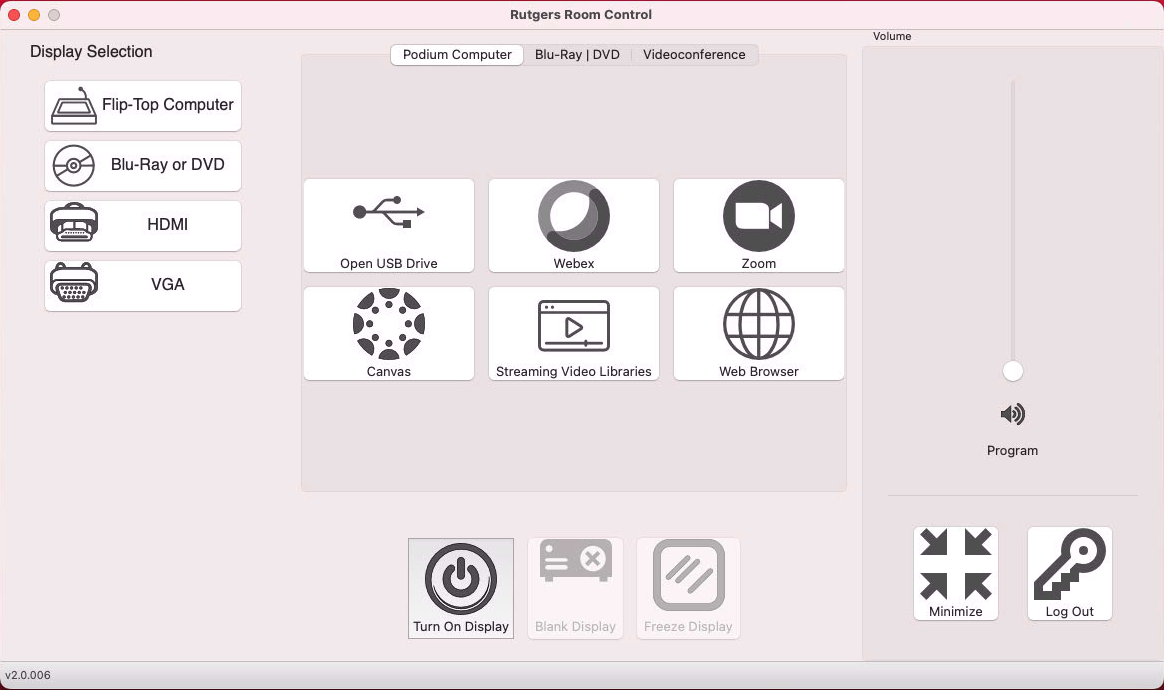
Rutgers Room Control
Rutgers Room Control is an application designed and refined in-house to control Digital Classroom Systems. Regardless of their classroom and type of system, Rutgers instructors can expect to find a consistent user interface.
Looking for More?
We’ve put all of our instructional information and one place for easy browsing.
